
Vendor Portal for Effective Vendor Management
Connect. Collaborate. Stay Compliant.
The Enlighta Vendor Portal gives organizations a central interface to communicate with vendors, collect and validate vendor information and documents, coordinate requests and responses, and enable vendor self-service updates. It connects these interactions with the underlying processes used to manage vendor risk, performance, compliance, and governance.
Connect. Collaborate. Stay Compliant.
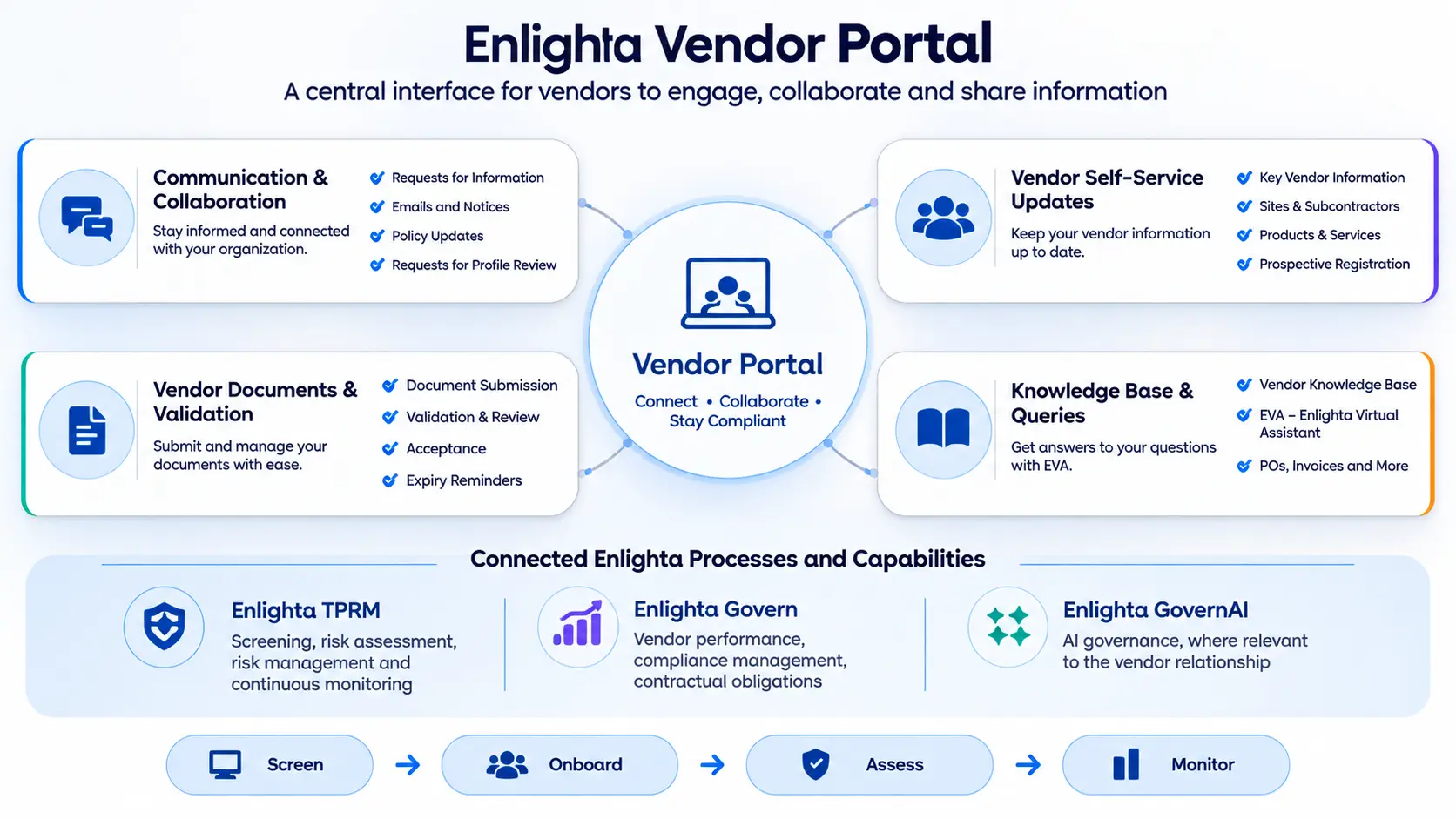
The Enlighta Vendor Portal is the vendor-facing interface for four capability areas — connected to the underlying Enlighta risk and governance processes.
Why Do Organizations Need a Vendor Portal?
Organizations need a reliable, up-to-date view of vendor information to support executive decisions, meet regulatory and internal policy requirements, and manage risks across the full vendor portfolio. A vendor portal helps organize vendor information, documents, communications, and updates, while internal teams retain responsibility for reviews and decisions.
Vendor Portal
JDABC Solutions
Welcome, ABC Solutions
Manage your information, complete requirements and stay up to date.
- Completed: 14
- In Progress: 2
- Pending: 1
- Overdue: 1
One requirement is overdue and requires follow-up.
14 of 18 tracked requirements complete (78%, illustrative) — not a compliance score.
Same illustrative demo data as the Vendor Self-Service screen — demonstration only, no live integrations.
Communication & Collaboration
Coordinate information requests, policy updates and notices with vendors. Vendors can review the message, understand the request and due date, submit their response and track the displayed status.
Compose a Vendor Request
Internal Vendor ManagementMessages & Requests
Signed in as ABC SolutionsIllustrative messages and responses — no real communications are sent by this demo.
Vendor Documents & Validation
Submit requested documents, review submission status and respond to follow-up. The organization can validate submitted information and make acceptance decisions through its internal processes.
Illustrative counts for the selected demo account (ABC Solutions) — not portfolio-wide data.
Showing representative records of the 8 uploaded documents (illustrative).
Illustrative invoice records — not connected to a live ERP or purchase-order system.
Document Review Queue
Internal demonstration — not a vendor-facing viewAll uploads, validations and approvals in this demo are simulated locally — receipt, validation, review and acceptance are separate states.
Demo only. Files are not transmitted to a live Enlighta system.
Demo only — the invoice is not transmitted, validated against a live ERP, or approved here.
Vendor Self-Service Updates
Vendors can maintain organization details, contacts, sites, subcontractor information, products and services. Submitted changes can then be reviewed through the organization’s internal process.
Organization Details
Signed in as ABC SolutionsContacts
Sites & Subcontractors
Products & Services
Profile Change Review
Internal demonstration — not a vendor-facing viewFictional demonstration data with reserved example domains — submitted changes never auto-approve; internal review is a separate step.
Vendor Help Center & EVA
Browse vendor guidance for common portal tasks, or use EVA to explore the answers available in this demonstration. Knowledge articles help vendors understand the steps and information required to respond to organizational requests.
Sample answers from demonstration data — EVA does not access live systems in this demo, and says so when information is not available.
One Vendor Interface. Connected Risk and Governance Processes.
Vendor-facing information exchange connects with the underlying processes used to manage risk, performance, contractual obligations, compliance, and governance.
Explanatory architecture — selecting a block does not execute a real integration. Demonstration content.
One Portal for Vendor Collaboration
The Enlighta Vendor Portal gives vendors a central place to maintain information, respond to organizational requests, submit documents and access task guidance. The portal connects vendor-facing interactions with the organization’s risk and governance processes, while internal teams retain responsibility for review, approval and decisions.