Meet EVA: a natural-language assistant for executive vendor decisions
Ask a business question. Explore the results. Create agents to act on what matters.
EVA, the Enlighta Virtual Assistant, provides a natural-language interface for exploring vendor information and creating and managing AI agents.
Executives can ask questions about their third parties, investigate relevant information from Enlighta and external sources, and refine their questions through follow-up prompts. EVA can also help authorized users create new AI agents using natural-language descriptions, test their behaviour, and execute or schedule them through the supported workflows.
These capabilities bring two important activities together: gaining insight and creating agents to carry out defined tasks, with human review and accountability.
Get insight through natural-language queries
EVA helps executives explore vendor and third-party information without navigating multiple screens and dashboards. It can query relevant information in Enlighta and combine it with external web information where the applicable sources and tools are configured.
Start with a business question:
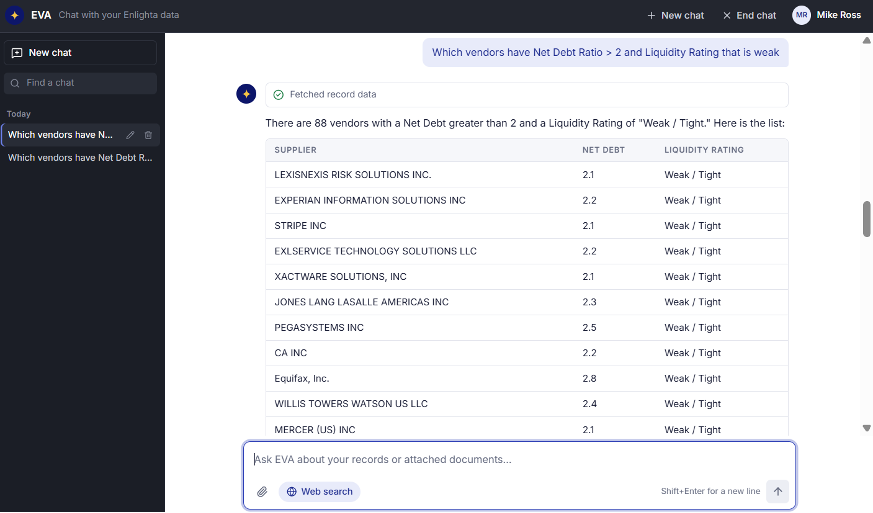
“Which vendors have Net Debt Ratio > 2 and Liquidity Rating that is weak”
EVA queries the available vendor records and returns the matching results for review. In this demonstration, the query returns 88 vendors matching the specified criteria.
Example of a natural-language query and matching vendor records in the demonstrated EVA environment. The displayed count is specific to this demonstration.
Go beyond internal records
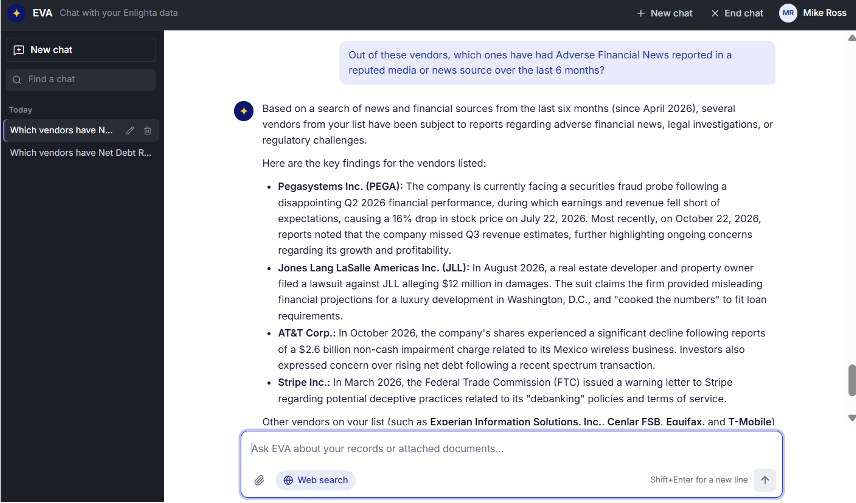
Continue the investigation with a follow-up question. Where configured, EVA can use relevant external web information to explore reported financial developments, management changes and other events associated with the selected vendors.
“Out of these vendors, which ones have had Adverse Financial News reported in a reputed media or news source over the last 6 months?”
Example of EVA extending an internal vendor query with relevant external reporting. Findings and available sources depend on the configured environment.
External findings should be checked against their original sources, publication dates, company identity and context before they are used in a vendor-risk decision. Internal records and externally sourced findings remain distinct: the first query matches Enlighta data, the follow-up reaches beyond it.
The investigation can continue in the same conversational context:
“Which of these findings warrant further review, and what additional information would help assess their significance?”
A possible way to continue the conversation. The questions users can ask, and any prompts EVA may suggest, depend on the configured environment.
More questions EVA can answer
SLA and Contract MonitoringExample query
“Which active contracts expire soon, and which vendors have SLAs approaching their minimum thresholds?”
EVA can help surface relevant contract and SLA information available through the configured tools and data.
Security and DORA ComplianceExample query
“Which vendors have security grades below B, and which third parties are flagged as requiring EU DORA compliance?”
Available where the necessary fields and queries are supported in the configured EVA environment.
Vendor Financial Metrics and Regulatory FindingsExample query
“Which vendors have Net Debt Ratio > 2 and Liquidity Rating that is weak?”
Demonstrated above, including the follow-up on adverse financial news over the previous six months. Results and source attribution are specific to the demonstrated session.
External Information and Internal RecordsExample query
“For these vendors, what adverse financial news has been reported in the last six months?”
A follow-up can investigate external developments concerning vendors identified in an initial Enlighta query. Internal records and externally sourced findings are presented as distinct sources.
Create and manage AI agents using natural language
EVA is not limited to answering questions. Authorized users can describe a task in natural language and use EVA to create a new AI agent for a defined purpose.
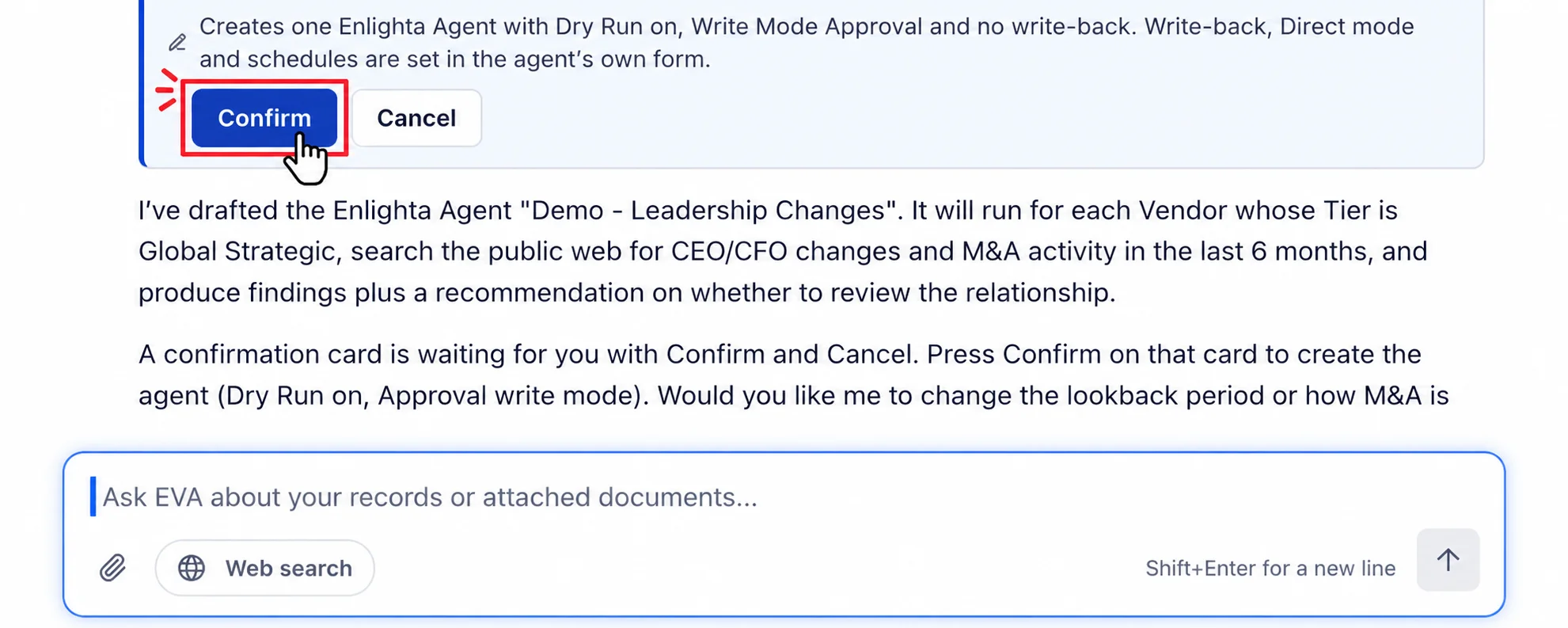
Describe the task you want the agent to perform. EVA prepares a proposed configuration that the user can review before confirming the action. This provides a natural-language path to creating a new agent without requiring the user to build the entire configuration manually.
Example of EVA drafting a new agent and presenting the proposed configuration for review and confirmation.
From agent creation to execution
1. DescribeExplain the task the new agent should perform.
2. ReviewInspect the proposed configuration and confirm the intended scope.
3. TestRun a dry run to examine the agent’s expected behaviour before committing its operational actions.
4. Execute or ScheduleRun the agent when required or configure a recurring schedule.
5. ManageQuery agents, monitor their operation, start or stop them, and view available metrics.
Human review remains part of the process. Users should check the proposed configuration and dry-run behaviour, confirm appropriate actions, and monitor the agent after it is activated. A proposed action takes effect only after the user reviews and confirms it.
What can you create an agent to do?
These use cases illustrate the kinds of agents users can describe. Each states what the agent monitors, what information it uses, what it produces and how the result reaches a responsible user.
Monitor Vendor Leadership Changes
MonitorsReputable public sources for material leadership changes among critical vendors.UsesConfigured public news and announcement sources.ProducesA summary of each change with the affected vendor, source and publication date, flagged for review.Reaches userFindings reach the responsible owner through configured notifications for review.
Track Material Financial Changes
MonitorsPublic financial reporting for material changes in vendor financial condition.UsesRelevant public financial reporting sources.ProducesSummarized developments with source and publication date, highlighted when a finding warrants review.Reaches userThe responsible user is notified when a finding warrants attention.
Monitor Subcontractor and Fourth-Party Adverse News
MonitorsAdverse news about known subcontractors and fourth parties tied to critical vendors.UsesConfigured public sources covering supply-chain dependencies.ProducesRelevant findings summarized with source details for review.Reaches userVisibility extends beyond direct suppliers to the reviewers responsible for each relationship.
Monitor Regulatory Changes and Compare Policies
MonitorsNew or amended directives from regulators such as RBI and SEBI relevant to third-party relationships.UsesRegulator websites plus policy documents stored in Enlighta.ProducesA summary of changes, affected policies and which documents should be reviewed.Reaches userRecommendations reach policy owners for investigation. The agent does not modify policy documents.
Track Competitor and Market Developments
MonitorsMaterial developments involving competitors relevant to the vendor ecosystem.UsesReputable industry and analyst sources.ProducesIdentified competitors meeting defined criteria with supporting sources summarized for review.Reaches userBusiness-intelligence findings reach the requesting user for assessment.
Monitor SLA Thresholds and Contract Expiry
MonitorsService levels approaching minimum thresholds and contracts approaching expiry.UsesContract, SLA and performance information available in Enlighta.ProducesRecords that may need attention before renewal or escalation.Reaches userThe responsible owner receives the records needing follow-up.
Monitor Security and DORA Compliance
MonitorsVendor security grades and third parties flagged as requiring EU DORA compliance.UsesSecurity and compliance fields available through the configured environment.ProducesVendors below the defined grade and records requiring further compliance review.Reaches userFindings reach risk and compliance reviewers through the configured workflow.
Proposed use cases. The available actions and findings depend on configured sources, tools, data access, permissions and product availability.
Connect questions to configured actions
EVA supports configured tools that can query information and, where authorized and available, support read-write operational workflows. One example from the roadmap:
“Read-Write Automation: dispatch vendor emails using predefined or custom templates through EVA.”
The availability, permissions, approval requirements and exact behaviour of each configured tool depend on the implementation. EVA does not execute arbitrary actions or modify records without appropriate configuration and authorization.
Manage agents beyond creation
Creating an agent is only the starting point. The full set of agent-management capabilities includes:
Create agentsSchedule agentsQuery agentsMonitor agentsStart or stop agentsView agent metrics
These capabilities help users manage a portfolio of agents according to their operational needs. Each is available only in releases and configurations where Product has enabled it.
Human accountability remains central
EVA helps users explore information and create or manage agent workflows, but its outputs must remain subject to appropriate review and oversight. Users should validate material findings, review agent configurations, assess dry-run behaviour where supported, and confirm actions in accordance with their organization’s permissions and governance policies.
Explore EVA in action
See how EVA supports natural-language vendor insight and agent creation through a guided product walkthrough.
EVA is Enlighta's natural-language assistant. It helps users explore vendor and third-party information through questions and follow-ups, and, where authorized, create and manage AI agents from natural-language descriptions.
Can EVA combine internal data with external information?
Where the appropriate sources and tools are configured, EVA can combine relevant information from Enlighta's application data with external web information. Coverage depends on the configured sources, tools and permissions of the implementation.
Can EVA create new agents?
Yes. Authorized users can describe a task in natural language, review the proposed configuration that EVA prepares, and confirm, execute or schedule the agent through the supported workflow, subject to the enabled capabilities and permissions.
What can users do with agents after creating them?
Depending on the available functionality, users can test agent behaviour, execute or schedule agents, query and monitor them, start or stop them, and review execution metrics.
Can EVA perform actions beyond answering questions?
Where configured and authorized, EVA supports operational workflows through configured tools, such as dispatching vendor emails using predefined or custom templates. The available actions depend on configuration, permissions and approval requirements.
Does EVA replace dashboards and reports?
No. EVA provides a conversational way to explore information and configure agents. Dashboards, records and configured workflows continue to support their respective functions.
Is a public EVA demo available?
A guided EVA walkthrough is available on request. Interested teams can contact Enlighta or visit the Demo Center for the demonstrations currently available.
Screenshots show the actual EVA interface from an approved demonstration environment. Agent and tool capabilities described here depend on the deployed product configuration, and no results or findings have been fabricated.
Tag:
Share Article:
E S
Enlighta’s software solutions empower enterprises to increase business value and mitigate risks in supplier and third-party engagements through data-driven insights into demand, performance, contract compliance & spend, and process automation for demand, selection, invoice validation, vendor governance, and third-party risk monitoring.